
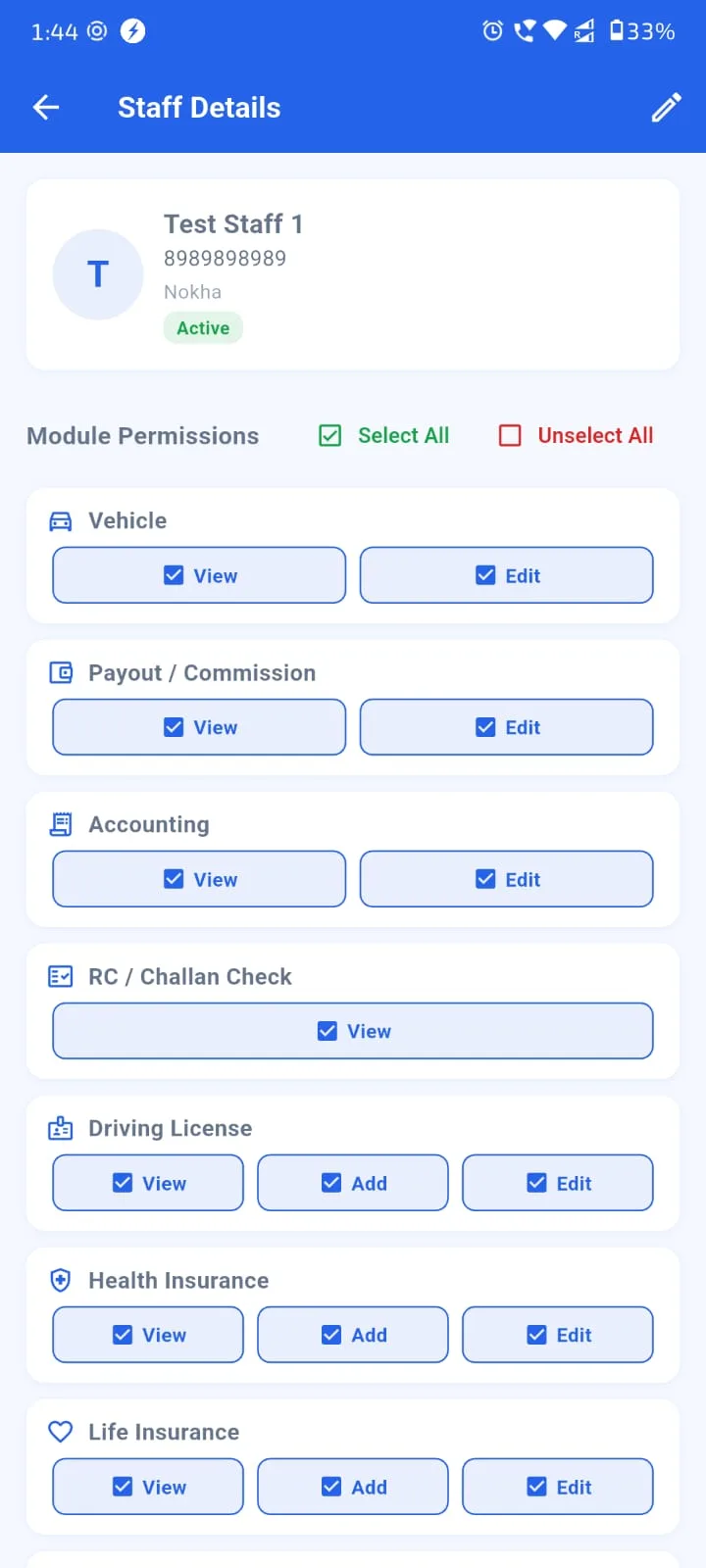
There is a quiet moment in every agency's growth journey that no one prepares you for: the day you hire your first staff member. Suddenly the simple working agreements you had with yourself — where customer data lives, who is allowed to see what, who is responsible for what — all become formal questions. A staff management module inside your insurance agency management software is what makes this transition smooth instead of chaotic. Role-based access, activity visibility per staff member, and clean handover workflows aren't enterprise frills — they're the basics any agency with even 2-3 employees needs from day one.
This guide walks through how Indian agency owners should think about staff management software, what each role should be able to see and do, how staff activity tracking actually helps (and where it crosses into surveillance), and what to do when someone leaves. Whether you're hiring your first tele-caller, expanding to a 5-person office, or running a multi-branch agency, the principles below apply.
Role-Based Access — Right Data To Right Person
Different roles in an insurance agency need different views of the same data. A tele-caller making renewal calls needs to see customer name, phone, policy expiry and last call notes — but probably shouldn't see commission earnings or financial summaries. A back-office assistant entering new policies needs full edit access on policy data but maybe limited read access on customer ledgers. A branch manager needs the consolidated view for their branch but not other branches. The owner needs everything.
A working insurance agent app at multi-staff scale handles this with role-based permissions. Common role templates:
- Owner / Agency Head: Full access to everything — customers, policies, commission, settings, billing, multi-branch dashboard.
- Branch Manager: Full access within their own branch. Read access on consolidated data.
- Insurance Agent / Producer: Full access to their assigned customers and policies. Limited view on other team members' books.
- Tele-caller / Front Desk: Read access on customer contact and renewal calendar. Limited edit on call notes and follow-up status. No access to commission data.
- Back-Office / Operations: Full edit access on policy data entry, document uploads, KYC. Limited access on financial summaries.
- Accountant / CA Access: Read access on commission MIS, ledger, receivables. No access to customer-personal data unless needed.
These templates can be customized further per agency. The key principle: never give blanket admin access to staff who don't need it. Tighter access controls reduce both honest mistakes and dishonest data leaks.
Staff Activity Tracking — Helpful, Not Surveillance
The phrase "productivity tracking" makes some agency owners uncomfortable — for good reason. Done badly, it becomes surveillance and erodes trust. Done well, it gives both you and your staff clear, fair visibility into their work. The right framing: activity tracking helps each staff member understand their own performance trends, and helps you spot when someone needs more training, more leads, or simply a different role.
The metrics that actually matter for insurance agency staff: calls made per day, follow-up actions completed, leads converted to policies, renewals secured, customer issues resolved, document uploads completed. Time-on-screen and minute-by-minute tracking is rarely useful — it just stresses people out without improving outcomes.
Each staff member should see their own scorecard. Comparisons between staff should be limited to managers and owner. A working client portfolio manage karne wala app with staff features typically presents this as "your activity this week" for each individual, plus a private "team comparison" view for managers — not a public leaderboard that creates anxiety.
Try Agenex Free
Every Agenex feature is included on a free trial — no credit card required. India's all in one insurance agent app with staff management built in.
Start Free TrialHandover Workflows — Inevitable, So Make Them Clean
Staff turnover is inevitable. People get better offers, family situations change, careers shift. The single most painful kind of staff departure is the unplanned one — someone leaves Friday evening, and Monday morning you realize their entire customer list, ongoing conversations, follow-up commitments and pending policy renewals are all locked in their account.
A proper staff handover workflow in your insurance digital assistant app means: when a staff member exits, their assigned customer base and active leads get redistributed to other team members in one click. All notes, call history, document uploads and pending follow-ups transfer with the customer. The exiting staff's login is deactivated cleanly. The owner can review everything that happened in that account in the last 90 days through audit logs.
The same workflow handles temporary handovers — someone going on maternity leave, someone taking a 30-day vacation, a tele-caller switching shifts. Customer continuity is maintained without dependency on any single person being available.
Incentive Calculations — Don't Do This Manually
Most Indian insurance agencies pay staff a combination of base salary + variable incentive tied to performance. Common structures: ₹X base + Y% of commissions on new business generated, or ₹X base + flat bonus per renewal secured + tiered bonus for hitting monthly targets.
Doing these calculations manually in Excel every month is one of the most error-prone tasks in agency operations. One wrong formula, one missed entry, one transposed digit — and you've underpaid (staff complains) or overpaid (you eat the cost). A staff incentive engine inside your commission reconciliation software reads the policy entries each staff member generated, applies their configured incentive formula, and produces a clean monthly slip ready for payment.
Staff sees their own monthly incentive accrual in real time — they know what they've earned by mid-month, which helps them push harder in the back half. End-of-month payments are accurate, on time, and disputable only against actual data — not against memory or claims. Like sub-agent split disputes, staff incentive disputes drop to near zero when there's a clean single source of truth.
When To Bring In Staff Management Software
If you're a solo agent with no staff, you don't need this. If you have one part-time helper, you can probably still get by with informal arrangements. But the moment you have:
- A second person handling customer interactions independently, or
- A back-office person doing data entry separately from your sales work, or
- A tele-caller specifically running renewal campaigns, or
- Multiple producers / agents working under your agency umbrella,
...you've crossed the threshold. At this stage, a clean role-based insurance agency management software with built-in staff features prevents months of avoidable chaos. POSPs registered through a PoSP agent registration app approach who then hire support staff often hit this point earliest because their model relies on volume.
The cost-benefit math: Agenex includes 2 free employee accounts on every plan, with additional seats available on higher plans. Compare this to the cost of a single mishandled staff handover (where you lose a customer because no one followed up on their renewal call) — and the math favors software adoption by a wide margin. Insurance lead manage kaise kare ka practical answer at multi-staff scale is: don't try to do it on memory or spreadsheets, put it inside the same system that runs your policies and commission.
FAQ
Multiple custom roles supported on higher plans. Common templates (owner, branch manager, agent, tele-caller, back-office, accountant view) are pre-configured and can be customized further.
Yes — each staff member sees their own activity summary (calls, follow-ups, leads converted, renewals secured). Cross-team comparisons are visible only to managers and the owner.
One-click reassignment to another team member. All notes, call history, document uploads and pending follow-ups transfer with the customer. The exiting staff's login is deactivated cleanly with an audit trail retained.
Yes — base + variable incentive structures are supported with customizable formulas per role. Monthly accruals are auto-calculated and visible to each staff member.
Basic role-based access is included on every Agenex plan with 2 free employee accounts. Advanced features (more roles, granular permissions, incentive engine) are available on higher plans.
Yes — the free Android insurance agent app has full role-based access support. Staff members log in on their own phones with their permissions automatically applied.
Staff are your employees (paid via salary + incentive). Sub-agents / POSPs are independent commission-share partners. Both are supported but treated differently — staff have role-based access to your agency data; sub-agents have their own ledger separate from yours.